Automation Platform > Architecture
Self-hosted execution flow
# Self-hosted execution flow Self-hosted execution keeps checkout, commands, and the sandbox filesystem on your infrastructure while the Automation Platform keeps orchestrating, observing, and routing inference. The split is a worker daemon that dials out to Warp — no inbound firewall ports — and executes tasks locally. The numbers in the diagram match the steps below.  ## How self-hosted execution works 1. **The worker connects and waits for work** - You run the managed worker (the `oz-agent-worker` daemon) on your infrastructure. It authenticates to Warp with an agent API key and holds an outbound-only connection, waiting for tasks routed to its [`--host`](/platform/self-hosting/#routing-runs-to-self-hosted-workers) ID. 2. **Warp delivers the task** - When a Slack mention, Linear or Jira event, schedule, API call, or `oz agent run-cloud` command targets your worker, the control plane sends the task with its resolved configuration and scoped runtime credentials over that same encrypted connection. 3. **The task executes on your backend** - The worker prepares the workspace from the run's [environment](/platform/environments/) — cloning repositories from your source control, running setup, and injecting allowed [secrets](/platform/secrets/) — then executes in a Docker container, a Kubernetes Job, or directly on the host, depending on the [backend](/platform/self-hosting/#managed-architecture) you chose. Code, build artifacts, and execution workspaces stay on your machines. 4. **Results stream back to the control plane** - Status, transcripts, artifacts, attachments, and telemetry flow to Warp for the run record. Content the agent puts into prompts, results, or transcripts can include code context, so review [security and networking](/platform/self-hosting/security-and-networking/) if that matters for your data classification. 5. **Inference routes through Warp** - The agent's model calls go from your worker to Warp's inference routing and on to LLM providers under [Zero Data Retention](/enterprise/security-and-compliance/security-overview/#zero-data-retention-zdr), with known secret values redacted in transit. Enterprise teams can route inference through their own provider accounts with [Bring Your Own LLM](/enterprise/enterprise-features/bring-your-own-llm/). 6. **Your team watches from the usual surfaces** - Runs on self-hosted workers appear in the cloud agent dashboard and support [Agent Session Sharing](/agents/local-agents/session-sharing/), the same as Warp-hosted runs. ## Sequence view The same flow as a request/response sequence between your infrastructure, the Warp control plane, and providers:  1. **Create task** - A trigger fires: an integration event, a schedule, an API or SDK call, a CLI command, or a Handoff. 2. **Assign task** - The control plane delivers the task over the worker's authenticated WebSocket, with resolved configuration and scoped runtime credentials. 3. **Prepare workspace** - The worker clones repositories with scoped credentials, runs setup commands, and injects allowed secrets. 4. **Prompt and context** - The agent gathers context inside the sandbox and sends it for inference. 5. **Inference** - Model calls route through Warp to LLM providers under ZDR with secrets redacted; [Bring Your Own LLM](/enterprise/enterprise-features/bring-your-own-llm/) can route eligible calls through your own provider account instead. 6. **Run tools** - Tool calls execute locally: files, commands, internal services, and MCP servers. 7. **Results** - Transcripts, artifacts, and telemetry stream back to the run record. 8. **Outputs** - The agent pushes branches and opens pull requests on your source control. 9. **Observability** - Your team follows and steers the run from the dashboard and shared sessions; teardown captures a workspace snapshot for handoff. ## Related pages * [Self-hosting overview](/platform/self-hosting/) - Managed vs unmanaged architectures and setup guides. * [Cloud agent run lifecycle](/platform/architecture/cloud-agent-run-lifecycle/) - The full lifecycle this flow plugs into. * [Data security and boundaries](/platform/architecture/data-security-boundaries/) - What stays on your infrastructure and what transits Warp.Tell me about this feature: https://docs.warp.dev/platform/architecture/self-hosted-execution/How a managed worker on your infrastructure claims cloud agent tasks over an outbound-only connection and streams results back to Warp.
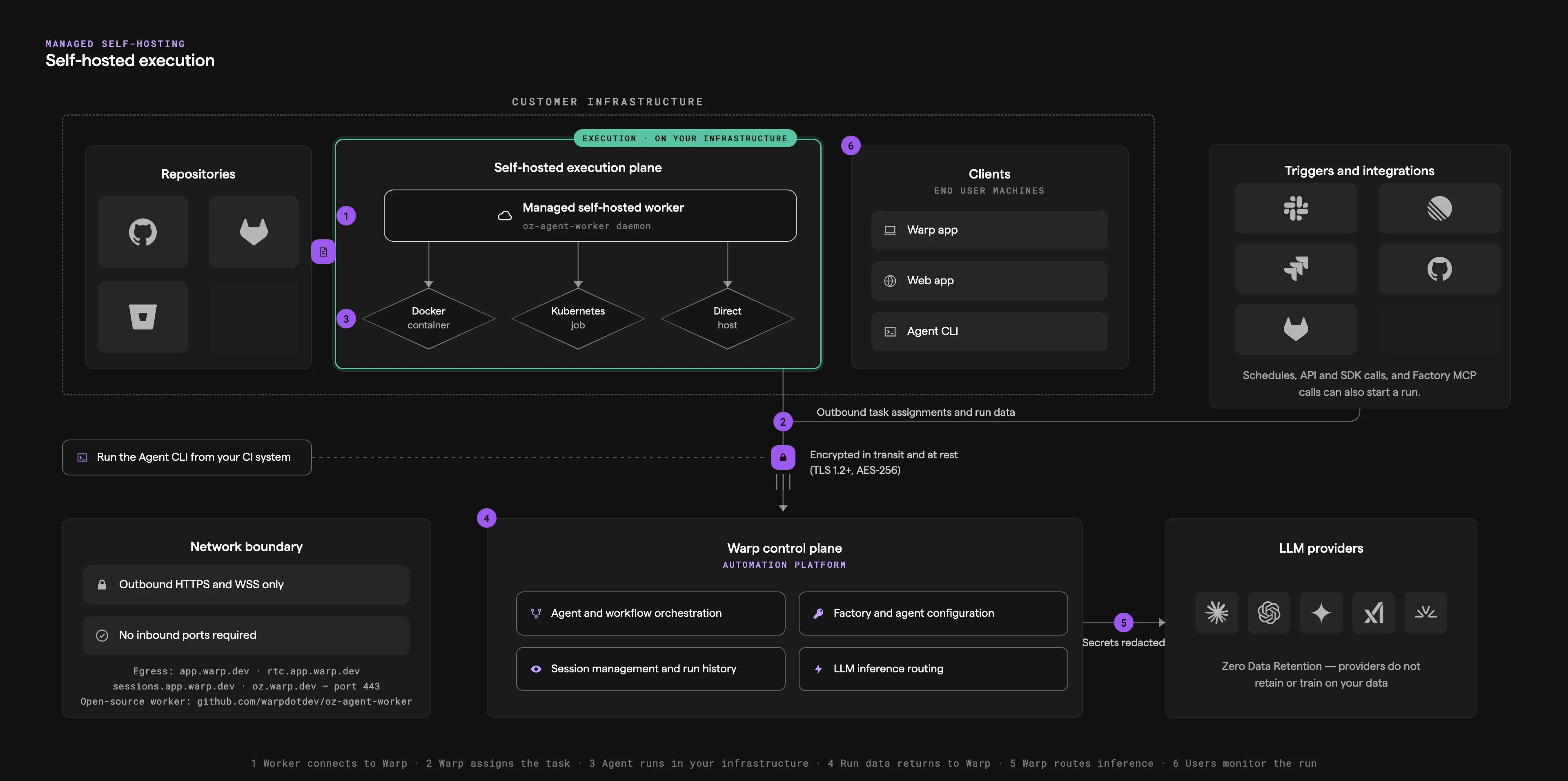
Self-hosted execution keeps checkout, commands, and the sandbox filesystem on your infrastructure while the Automation Platform keeps orchestrating, observing, and routing inference. The split is a worker daemon that dials out to Warp — no inbound firewall ports — and executes tasks locally. The numbers in the diagram match the steps below.
How self-hosted execution works
Section titled “How self-hosted execution works”- The worker connects and waits for work - You run the managed worker (the
oz-agent-workerdaemon) on your infrastructure. It authenticates to Warp with an agent API key and holds an outbound-only connection, waiting for tasks routed to its--hostID. - Warp delivers the task - When a Slack mention, Linear or Jira event, schedule, API call, or
oz agent run-cloudcommand targets your worker, the control plane sends the task with its resolved configuration and scoped runtime credentials over that same encrypted connection. - The task executes on your backend - The worker prepares the workspace from the run’s environment — cloning repositories from your source control, running setup, and injecting allowed secrets — then executes in a Docker container, a Kubernetes Job, or directly on the host, depending on the backend you chose. Code, build artifacts, and execution workspaces stay on your machines.
- Results stream back to the control plane - Status, transcripts, artifacts, attachments, and telemetry flow to Warp for the run record. Content the agent puts into prompts, results, or transcripts can include code context, so review security and networking if that matters for your data classification.
- Inference routes through Warp - The agent’s model calls go from your worker to Warp’s inference routing and on to LLM providers under Zero Data Retention, with known secret values redacted in transit. Enterprise teams can route inference through their own provider accounts with Bring Your Own LLM.
- Your team watches from the usual surfaces - Runs on self-hosted workers appear in the cloud agent dashboard and support Agent Session Sharing, the same as Warp-hosted runs.
Sequence view
Section titled “Sequence view”The same flow as a request/response sequence between your infrastructure, the Warp control plane, and providers:
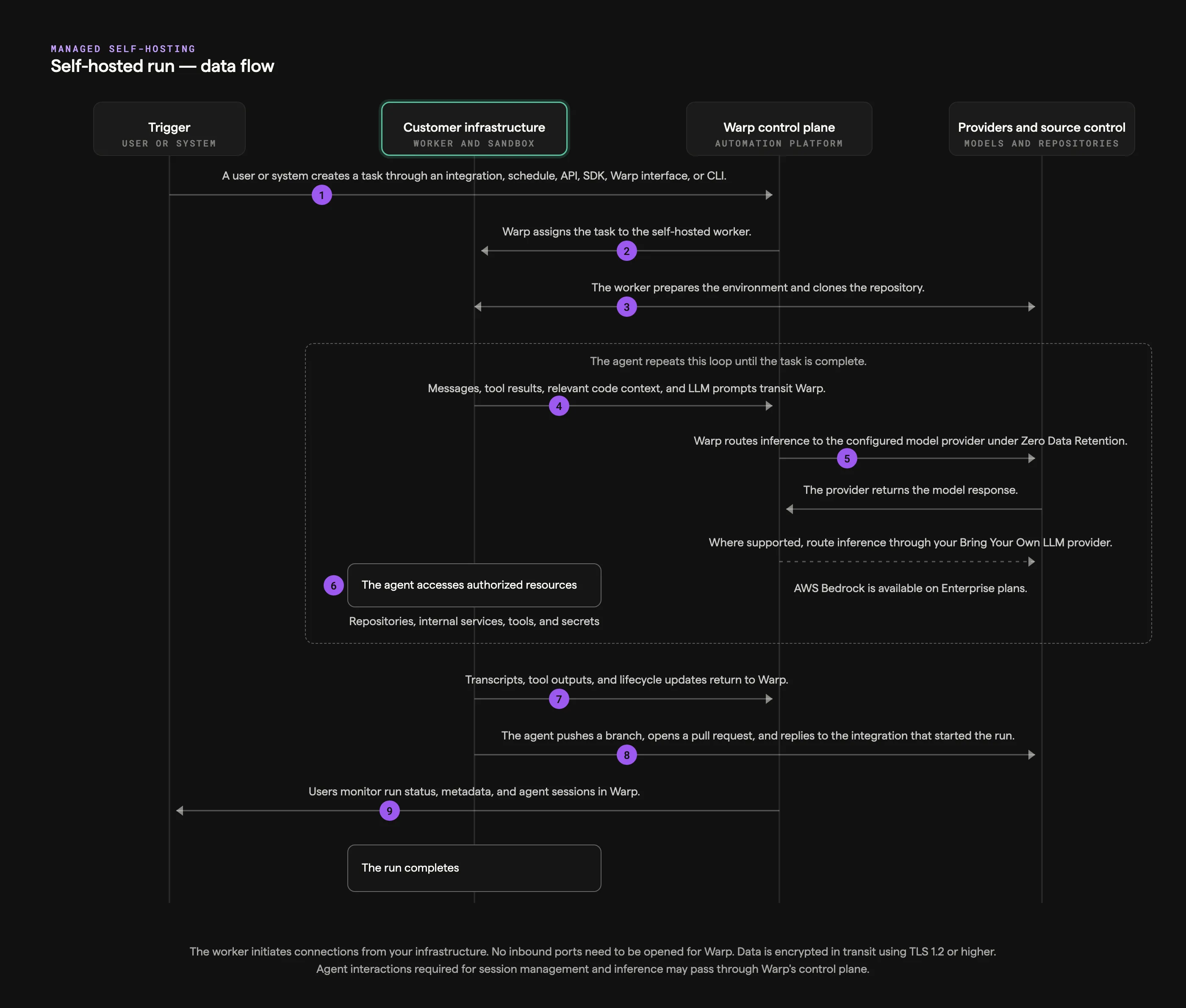
- Create task - A trigger fires: an integration event, a schedule, an API or SDK call, a CLI command, or a Handoff.
- Assign task - The control plane delivers the task over the worker’s authenticated WebSocket, with resolved configuration and scoped runtime credentials.
- Prepare workspace - The worker clones repositories with scoped credentials, runs setup commands, and injects allowed secrets.
- Prompt and context - The agent gathers context inside the sandbox and sends it for inference.
- Inference - Model calls route through Warp to LLM providers under ZDR with secrets redacted; Bring Your Own LLM can route eligible calls through your own provider account instead.
- Run tools - Tool calls execute locally: files, commands, internal services, and MCP servers.
- Results - Transcripts, artifacts, and telemetry stream back to the run record.
- Outputs - The agent pushes branches and opens pull requests on your source control.
- Observability - Your team follows and steers the run from the dashboard and shared sessions; teardown captures a workspace snapshot for handoff.
Related pages
Section titled “Related pages”- Self-hosting overview - Managed vs unmanaged architectures and setup guides.
- Cloud agent run lifecycle - The full lifecycle this flow plugs into.
- Data security and boundaries - What stays on your infrastructure and what transits Warp.